

Subdomain Manager
With the Subdomain Manager in the OXY.Games control panel, you can create your own server address such as
myserver.blokje.net or testserver.craftzone.vip.
This means players no longer need to type long IP addresses or ports — just a simple, memorable name!
For Minecraft servers, an SRV record is automatically created, allowing players to join without specifying the port. ✨
What is a subdomain?
Section titled “What is a subdomain?”A subdomain makes your server easier to reach and gives it a professional touch.
For example:
myserver.blokje.netinstead of192.168.1.22:30140- Automatic DNS linking managed by OXY.Games
- Support for multiple base domains (like
blokje.net,craftzone.vip, etc.) - Easily edit or remove subdomains at any time
🪄 How to create a subdomain
Section titled “🪄 How to create a subdomain”-
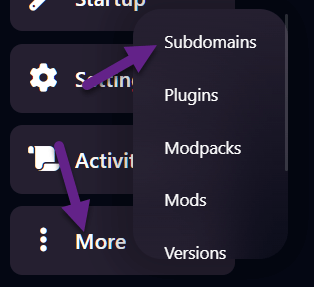
In your game panel, go to More → Subdomains
-
Click Create Subdomain

-
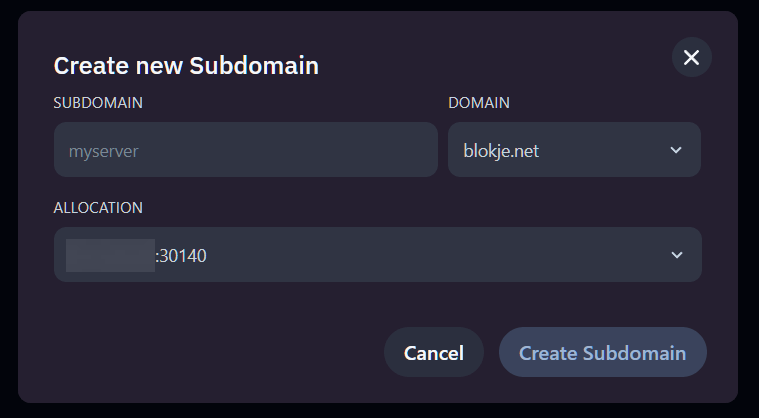
In the popup window, fill in the following fields:
- Subdomain: Choose the desired name (at least 3 characters).
⚠️ Some names may not be allowed. - Domain: Select which base domain to use (e.g.
blokje.net). - Allocation: Select the correct IP and port combination for your server.
- Subdomain: Choose the desired name (at least 3 characters).
-
Click Create Subdomain
If everything went well, your new subdomain will appear in the list:

💡 After creation, it can take up to a few hours (usually 1–2) for DNS to fully propagate and become accessible worldwide.
✏️ How to update a subdomain
Section titled “✏️ How to update a subdomain”To change an existing subdomain (for example, to a different port):
- Go to More → Subdomains
- Click Update next to the subdomain you want to edit
- Adjust the desired settings
- Click Update Subdomain
Your changes will be applied immediately.
🗑️ How to delete a subdomain
Section titled “🗑️ How to delete a subdomain”If you no longer need the subdomain:
- Go to More → Subdomains
- Click the delete icon (🗑️) next to the domain name
- Once deleted, it will be removed from the list and from DNS.
⏳ Note: DNS propagation
Section titled “⏳ Note: DNS propagation”It may take up to 2 hours before DNS changes are visible everywhere.
You can often test it earlier by connecting directly in Minecraft — sometimes it’s live within minutes!
🎉 Done!
Section titled “🎉 Done!”Your server is now reachable via your own subdomain — easy to share with friends or your community, without any IP hassle.