

Renew Your Server Automatically
At OXY.Games you pay up front per month (or longer). Automatic renewal is switched on by default on every order. Three things to keep apart:
- Balance is your wallet in the client area. Every payment lands on your balance first, and your balance pays for your server.
- Automatic renewal is a setting per server. On = we try to renew your server before it expires.
- Where that money comes from depends on how you pay — and that’s where it usually goes wrong. Pick your situation below.
I pay with iDEAL, Bancontact or card
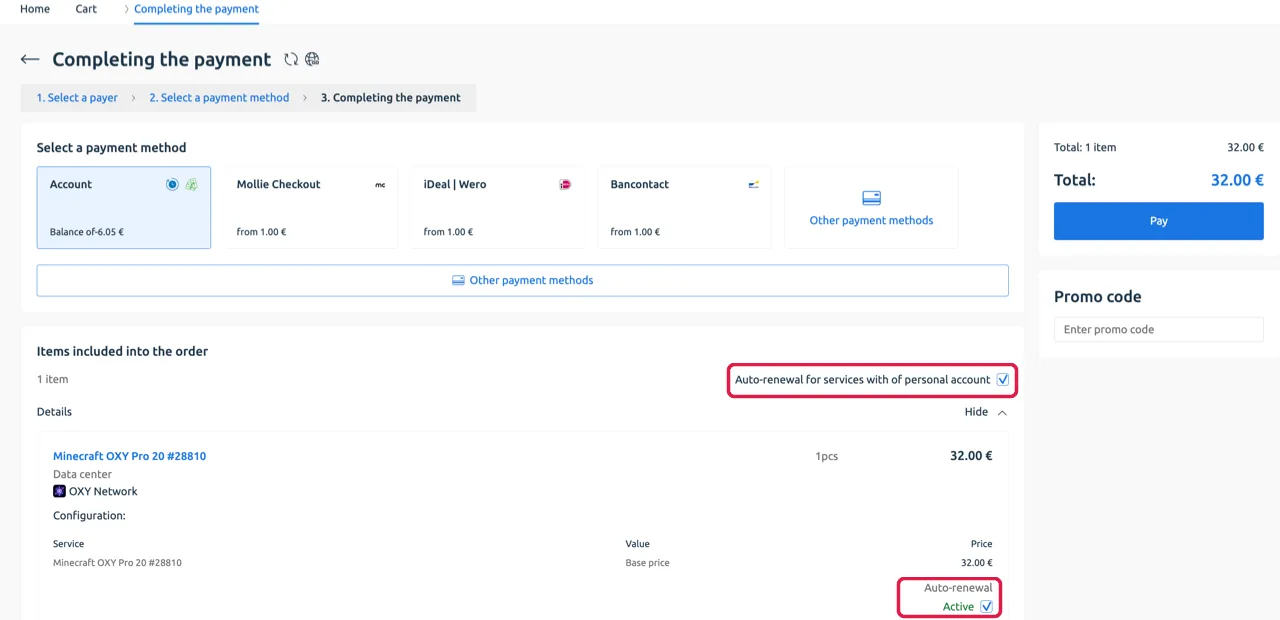
Section titled “I pay with iDEAL, Bancontact or card”iDEAL, Bancontact and card payments cannot be charged automatically. That’s why the checkout checkbox is called “Auto-renewal for services with personal account”: personal account = your balance, so your server renews from your balance.
- Leave the checkbox on (it’s on by default).
- Make sure there’s enough balance on your account before the expiry date — you get a reminder email a few days ahead. Add balance.
- Not enough balance? Your server stops on the expiry date. Add balance and it renews by itself — nothing to re-order, as long as renewal is on.
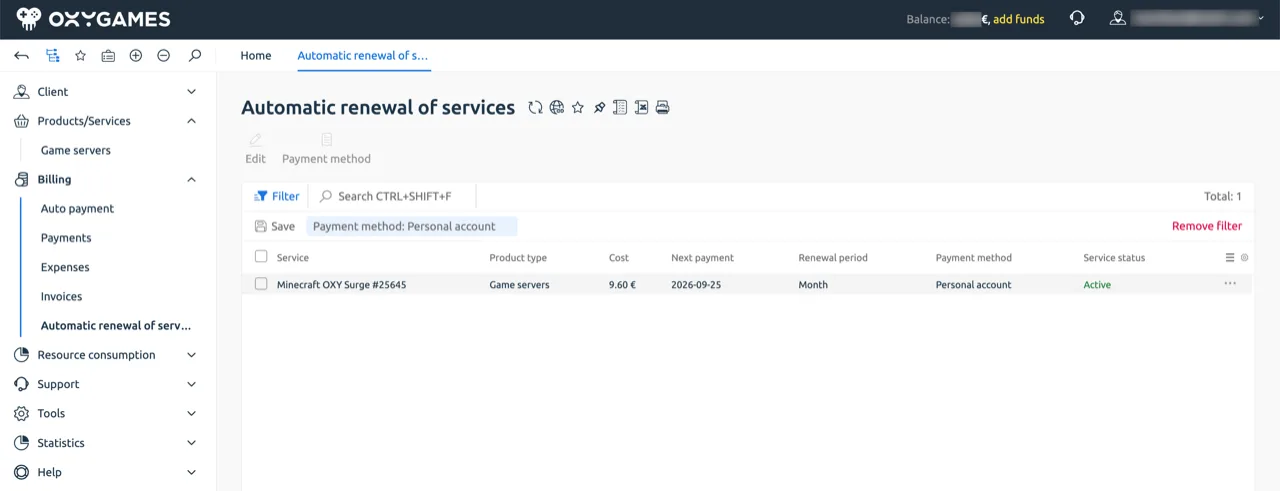
You can see this under Billing → Automatic renewal of services: Payment method shows Personal account — that means “from your balance”.
I pay with PayPal
Section titled “I pay with PayPal”- Leave Automatic renewal on at checkout.
- Pay once with PayPal. PayPal will ask you to allow automatic payments to OXY.Games.
- Done. Each period is paid automatically through PayPal. Under Billing → Automatic renewal of services, Payment method then shows PayPal.
Turning auto-renewal off (or back on)
Section titled “Turning auto-renewal off (or back on)”At checkout: the order summary has the Automatic renewal checkbox — on by default, untick it if you don’t want it.
For an existing server there are two places:
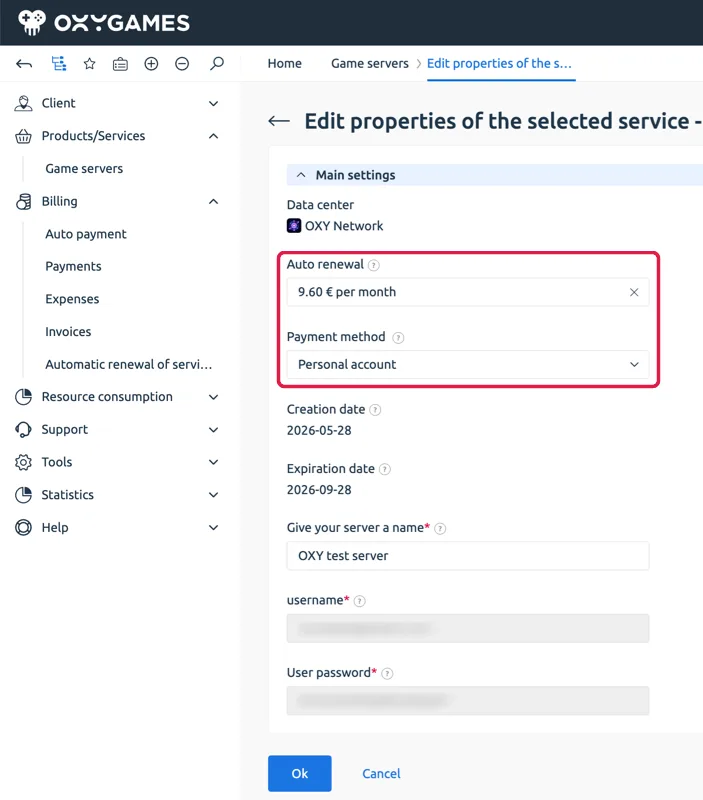
- Products/Services → Game servers → select your server → Edit. Auto renewal shows the period and price (e.g. 9.60 € per month); click the × to turn renewal off, or pick a period to turn it on. Payment method sets what it renews from: Personal account (= your balance) or PayPal.
- Billing → Automatic renewal of services → overview of all your services on auto-renewal, with the payment method per server. Select a server and use Edit or Payment method — same settings as above.
You can turn it off any time. Your server simply runs until the expiry date and stops after that. You then renew manually.
What if the renewal fails?
Section titled “What if the renewal fails?”- PayPal: we start charging 3 days before the expiry date. Balance: the renewal happens on the expiry date itself. If it fails (PayPal declined, not enough balance) you get an email.
- PayPal: check your PayPal balance or linked account. Once PayPal works again, we retry the next day.
- Balance: add balance — the server renews automatically afterwards.
- A stopped server isn’t gone yet, but it is permanently deleted after a few days (how many depends on the plan). Not sure? Take a backup first.
Optional: auto payment (PayPal only)
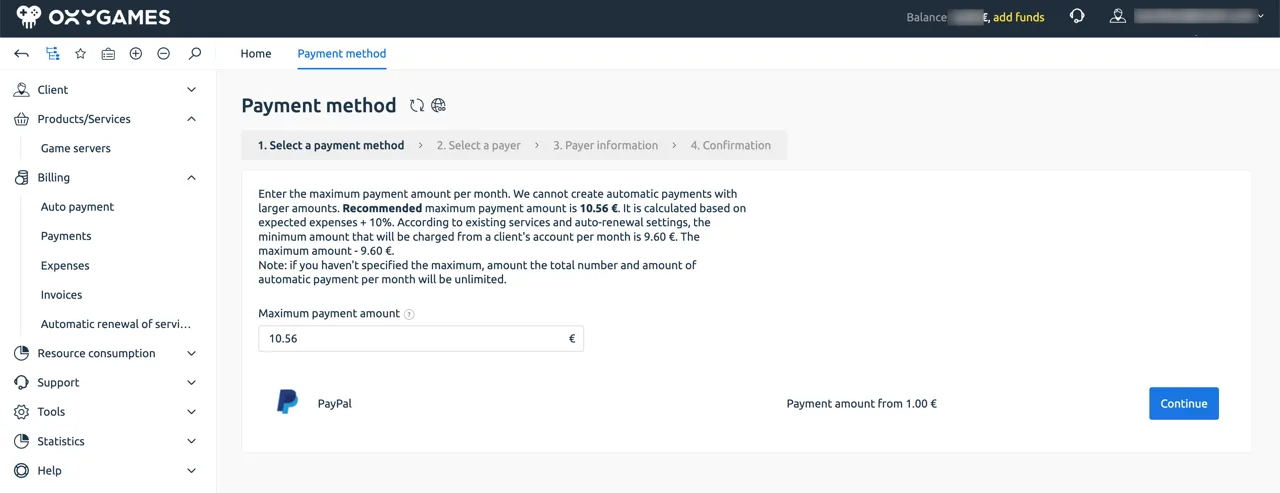
Section titled “Optional: auto payment (PayPal only)”Under Billing → Auto payment you can let PayPal top up your balance automatically when it’s too low for a server with automatic renewal. You set a maximum amount per month as a cap; the system suggests one just above your expected monthly cost. It never charges more than your server actually costs — the maximum is only a safety limit.
Useful if you run several servers and want one PayPal charge for all of them. One server, paying with PayPal? You don’t need this — automatic renewal already handles it.
I paid with iDEAL and automatic renewal is on. Will my bank account be charged automatically? No. iDEAL can’t charge automatically. Your server only renews if there’s enough balance on your account.
I don’t want anything charged automatically. Turn renewal off under Game servers → Edit → Auto renewal → × (or via Billing → Automatic renewal of services). You can always renew manually.
My server stopped. Do I have to order again? No, as long as it hasn’t been deleted yet. Add balance (or renew manually) and it comes back on.
Why do I see both “Auto payment” and “Automatic renewal”? Renewal = per server. Auto payment = topping up your balance via PayPal. You rarely need the second one.
Still stuck? Create a ticket and we’ll look with you.