

How to reinstall
Made a mistake during installation?
Or just want to start fresh? You can easily reinstall your server from the control panel.
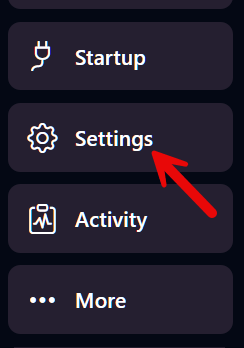
Step 1 – Open the Settings menu
Section titled “Step 1 – Open the Settings menu”In the left-hand menu, click on Settings.
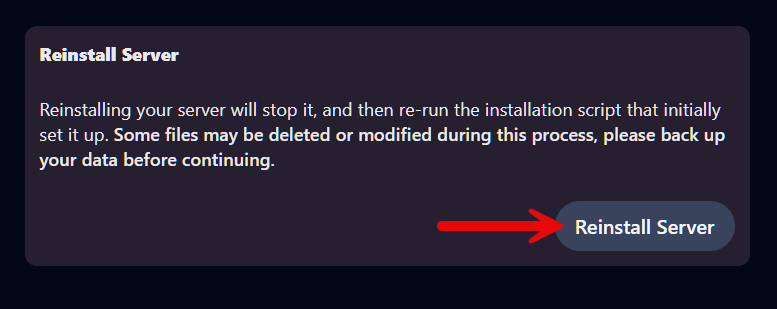
Step 2 – Click ‘Reinstall Server’
Section titled “Step 2 – Click ‘Reinstall Server’”Scroll down until you see the Reinstall Server section. Click the button.
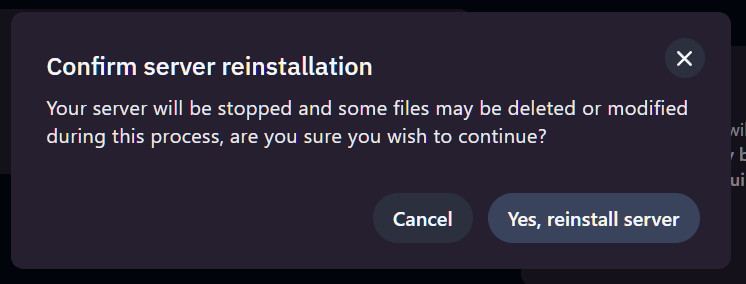
Step 3 – Confirm your choice
Section titled “Step 3 – Confirm your choice”A warning will appear. Click Yes, reinstall server to continue.
⚠️ Important: Files may be deleted
Section titled “⚠️ Important: Files may be deleted”During reinstallation, some files on your server will be overwritten or deleted —
this includes custom plugins, mods, and world data.
💡 Always make a backup first if you want to keep anything!
👉 How to make a backup