

Make a player an admin
Operators can run commands and manage the server from inside the game. Two ways to grant it: the Player Manager in the panel, or the console.
What you'll do
- Have the player join once
- Open More → Players
- Click Make OP
- Or use the op command
Via the Player Manager
Section titled “Via the Player Manager”-
Let the player join once
Section titled “Let the player join once”The Player Manager lists players the server has seen. A new player must connect once before they appear.
-
Open More → Players
Section titled “Open More → Players”In the game panel open your server and go to More → Players.
-
Make OP
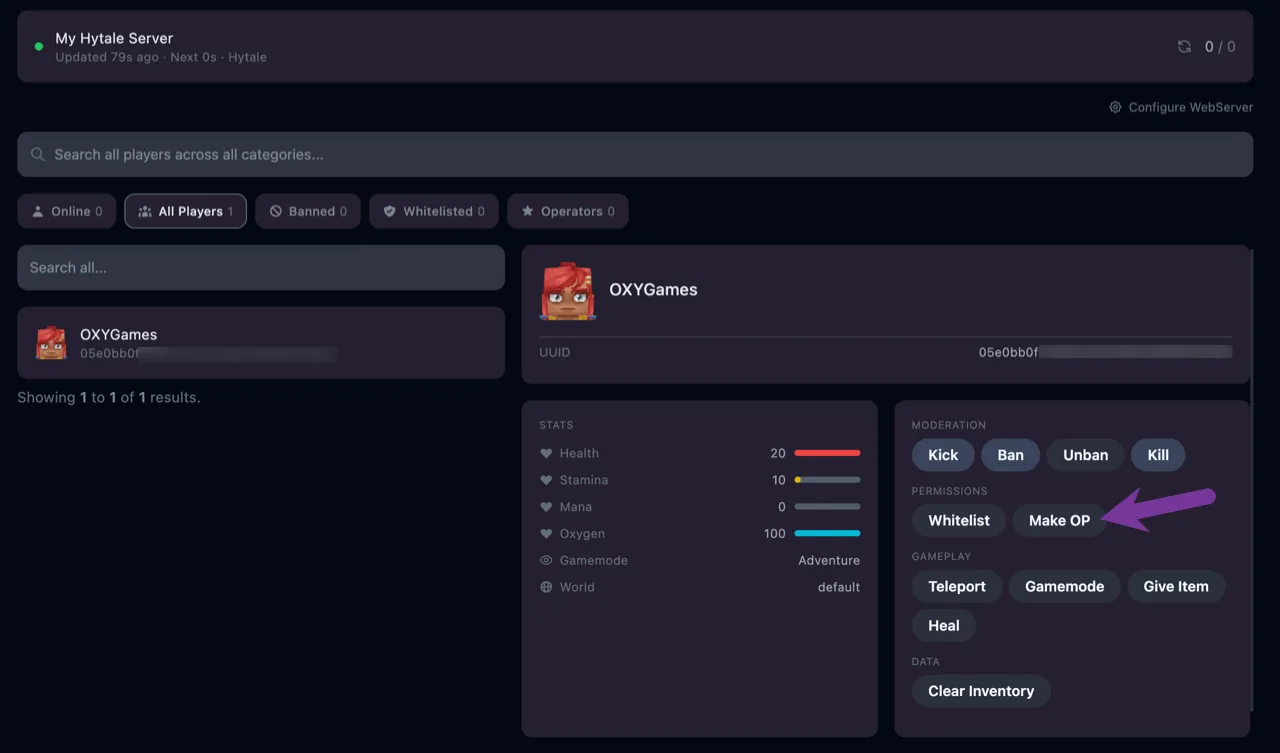
Section titled “Make OP”Select the player and click Make OP under Permissions. The change applies immediately.
Via the console
Section titled “Via the console”On the Console tab:
/op self/op add PlayerName/op remove PlayerNameself targets your own account. Other players can be given by username or UUID; if the console can’t find a name, have the player join once and try again.
Extra tips
Section titled “Extra tips”- Keep the operator list short. Operators can change the world and kick players.
- Combine with a whitelist on private servers.