

Enable PvP
PvP is one setting, per world. Two ways to flip it: the Config Editor in the panel, or a console command.
What you'll do
- Open More → Hytale Config
- Pick the world
- Set IsPvpEnabled
- Restart, or use the command
Via the Config Editor
Section titled “Via the Config Editor”-
Open the config
Section titled “Open the config”In the game panel open your server and go to More → Hytale Config.
-
Select the world
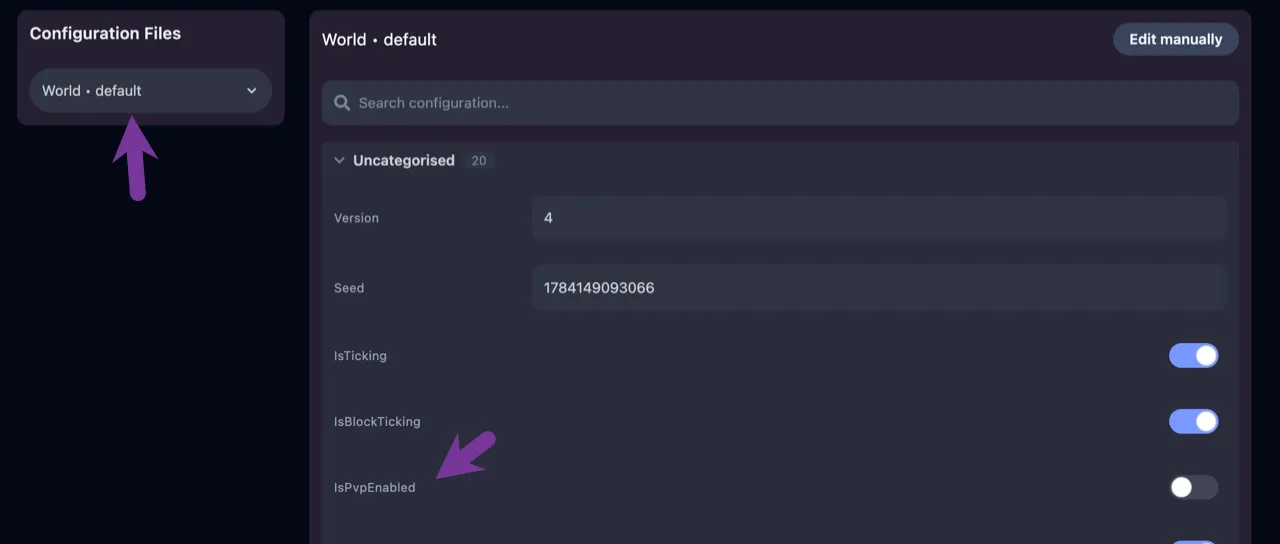
Section titled “Select the world”PvP is set per world. Pick the one you want to change.
-
Set IsPvpEnabled and restart
Section titled “Set IsPvpEnabled and restart”Set IsPvpEnabled to true, save, and Restart the server.
Via the console
Section titled “Via the console”No restart needed:
/setpvp true/setpvp falseExtra tips
Section titled “Extra tips”- Running several worlds? Apply the setting to each world you want PvP in.
- Announce the change to your players; PvP on a formerly peaceful server is a common source of complaints.