

Set up a whitelist
With the whitelist on, only players you approved can join. Ideal for a friends-only world.
What you'll do
- Add yourself and your admins
- Add your players
- Enable the whitelist
- Manage it later from the console
Via the Player Manager
Section titled “Via the Player Manager”-
Open More → Players
Section titled “Open More → Players”In the game panel open your server and go to More → Players.
-
Whitelist each player
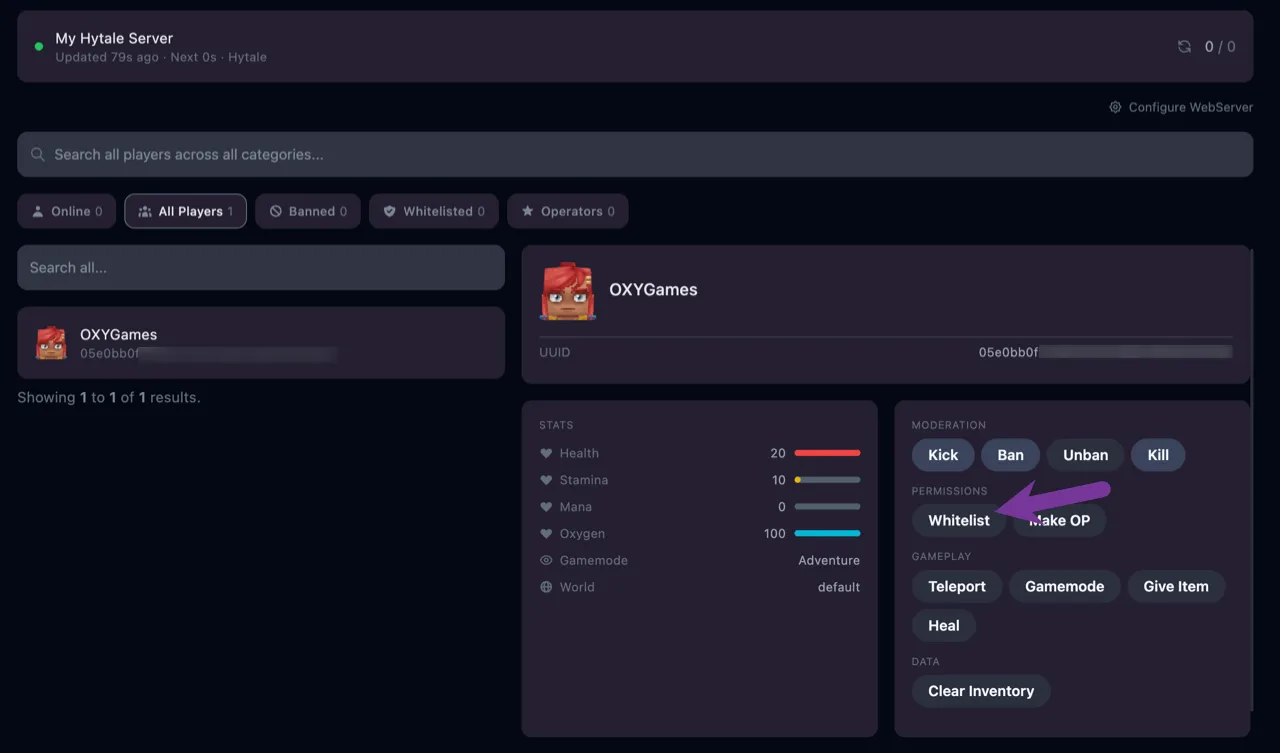
Section titled “Whitelist each player”Select a player and click the Whitelist icon under Permissions. Repeat for everyone who may join, starting with yourself.
-
Enable the whitelist
Section titled “Enable the whitelist”Turn the whitelist on, in the Player Manager or from the console with
/whitelist enable.
Via the console
Section titled “Via the console”/whitelist add PlayerName/whitelist enable| Command | What it does |
|---|---|
/whitelist remove PlayerName | Remove one player |
/whitelist list | Show who is on the list |
/whitelist clear | Remove everyone |
/whitelist disable | Turn the whitelist off |
Extra tips
Section titled “Extra tips”- A server password is the lighter alternative when you don’t want to manage names.
- A player who “can’t connect” on a whitelisted server is usually missing from the list, see Players can’t connect.